Ofisbop — a free office suite in Uzbek for documents, spreadsheets, slides and PDF

Open, edit and save Word, Excel, PowerPoint and PDF files, with or without internet. Runs on Windows, Mac, Linux, Android and in the browser. No ads, no sign-up.

Windows 10 and 11, 64-bit. Version 1.0.26, free.

Other options: macOS, Linux, Microsoft Store, portable version.

  • Windows
  • macOS
  • Linux
  • Android
  • Browser
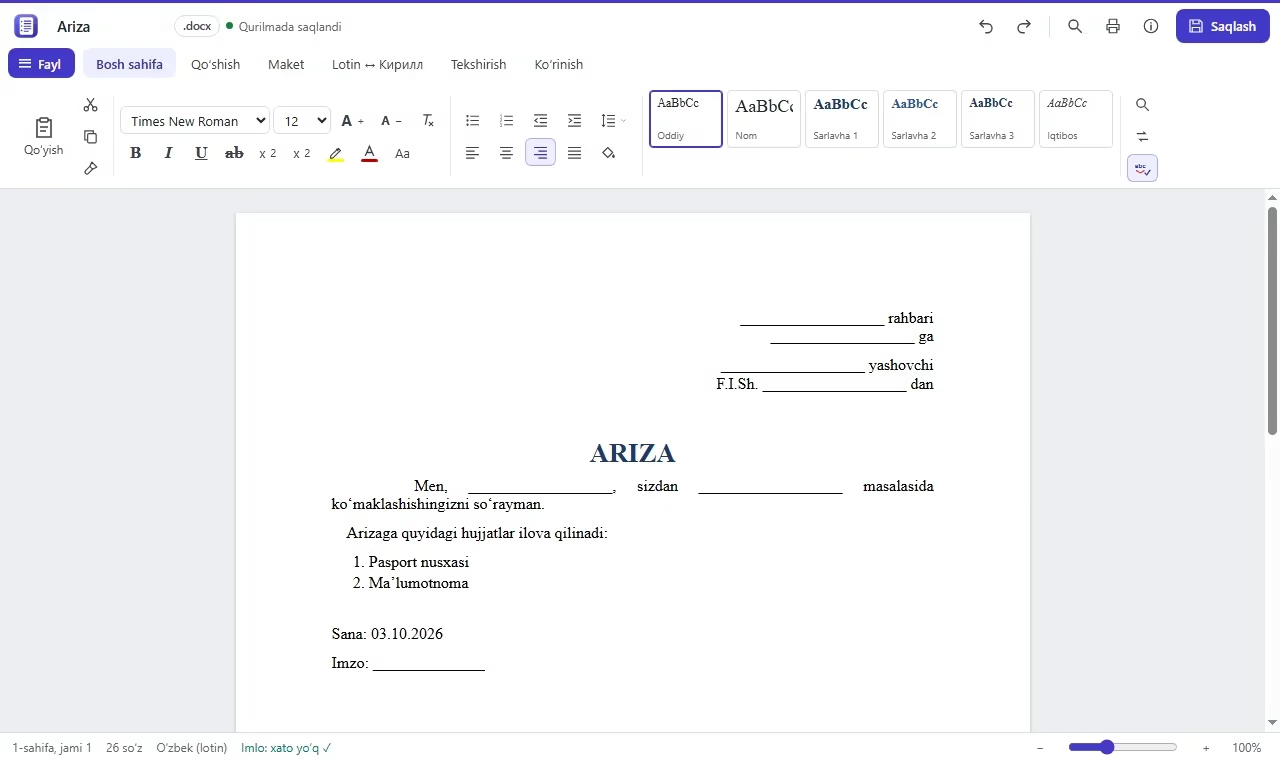
Ofisbop Hujjat window with an application letter in Uzbek and the ribbon menu on top

Four apps, one install

Letters and applications, budget spreadsheets, presentations and PDFs for everyday work. The interface is in Uzbek, Russian or English.

Ofisbop Hujjat: application letter template with misspelled words underlined in red

Ofisbop Hujjat

A word processor for applications, official letters, contracts, essays and reports.

  • Fonts, styles, headings, lists, tables and images
  • Uzbek spell-check and Latin ↔ Cyrillic conversion
  • Official document margins in one click; A4, A5, A3 and Letter
  • Print as a booklet, double-sided, or 2 and 4 pages per sheet

Formats: .docx, .doc, save as PDF

More about the word processor

Ofisbop Jadval: monthly budget template calculated with formulas

Ofisbop Jadval

Spreadsheets for budgets, timesheets, invoices and reports.

  • SUM, IF, VLOOKUP, XLOOKUP, SUMIFS and hundreds more formulas
  • Type “=” and a description of the formula with an example appears
  • Charts, filters, sorting, frozen rows and columns
  • Number, currency, percent and date formats, multiple sheets

Formats: .xlsx, .xls, .csv, save as PDF

More about spreadsheets

Ofisbop Taqdimot window: slide list on the left, the slide being edited in the middle

Ofisbop Taqdimot

A presentation editor for lessons, thesis defenses and project pitches.

  • Ready-made slide layouts and themes
  • Text, images, shapes and tables
  • Full-screen slideshow

Formats: .pptx, .ppt

More about presentations

Ofisbop PDF viewer: page thumbnails on the left, view, annotate, fill and sign tabs on top

Ofisbop PDF

Read PDFs, add comments, fill in forms and sign.

  • Search, outline, highlights and comments
  • Form filling and signatures
  • Reorder, merge, split and compress pages
  • Convert a PDF to an editable Word document

Formats: .pdf, export to Word

More about the PDF editor

Built for the Uzbek language

Spelling, both scripts and official document rules are part of the app.

Spell-check

Uses its own dictionary and works offline. Misspelled words get a red wavy underline; click one to see suggestions. You can add words to a personal dictionary.

Latin ↔ Cyrillic

Convert a whole document or spreadsheet to the other script in one click. Bold, italics, colors and tables stay as they were. It also converts to the new Uzbek alphabet (Ö, Ğ, Ş, Ç): online converter and letter table.

Official documents

Standard margins in one click: 2 cm top and bottom, 3 cm left, 1.5 cm right. Templates for applications, official letters and the obyektivka form are included.

Ofisbop Hujjat with the script conversion tab open and the letter converted to Cyrillic

New in recent versions

The full changelog is on the news page (in Uzbek).

  • New Uzbek alphabet 1.0.24

    The “Lotin → Yangi” button converts a document, spreadsheet or presentation to the letters Ö, Ğ, Ş, Ç in one click, and “Yangi → Lotin” converts it back. Works offline. Online converter

  • Share by link 1.0.21

    Send a document, spreadsheet, presentation or PDF as an ofisbop.uz/s/… link. Links last 1, 7 or 30 days, with an optional password. The recipient opens the file in Ofisbop or in the browser.

  • Shortcut and formula help 1.0.21

    Press F1 or Ctrl+/ to see every keyboard shortcut for the current window. In spreadsheets, each of the 425 functions comes with an explanation in Uzbek and a small example.

  • Lite mode for low-end computers 1.0.21

    On computers with 4 GB of memory or less, Ofisbop switches to lite mode by itself: animations and shadows are turned off, so the processor has less to do. You can also pick the mode in the About window.

  • Prints as it looks on screen 1.0.20

    Documents print with exactly the page breaks you see on screen. Table rows no longer split across two pages.

Ofisbop print dialog with Booklet selected and the front and back of the sheet previewed on the left

Download Ofisbop

Free, no sign-up. Once installed, it works without internet.

SHA-512 checksums and detailed instructions are on the download page (in Uzbek).
SystemRequirementsHow to install
WindowsWindows 10 or 11, 350 MB of disk space. On a 32-bit computer the site shows you the right option.Installer, portable version or Microsoft Store
macOSmacOS 12 or later, about 130 MB .dmg fileApple Silicon (M1–M4) or Intel
Linux64-bit: Ubuntu 22.04+, Debian 12+, Linux Mint 21+.deb for Ubuntu and Debian or AppImage
AndroidAndroid 7 or later, phones and tabletsGoogle Play or APK file
BrowserChrome, Edge or Firefox; also works for Windows 7 and 8ofisbop.uz/app/, nothing to install. Click the Install icon and the browser version opens offline too.

Installing on Windows

  1. Download the installer and run it.
  2. If a blue “Windows protected your PC” (SmartScreen) window appears, click “More info”, then “Run anyway”. This is a normal warning for new apps.
  3. Click “Install”. An Ofisbop shortcut appears on your desktop.

First launch on a Mac

  1. Open the .dmg and drag Ofisbop into Applications.
  2. The app is not notarized by Apple yet, so macOS won’t open it the first time. Click “Done”.
  3. Go to System Settings → Privacy & Security and click “Open Anyway”. On macOS 12–14 it’s quicker to Control-click the icon and choose “Open”. You only need to do this once.

Works offline

  • Creating, editing and saving documents, spreadsheets and presentations
  • Formulas, charts, PDF and printing
  • Spell-check and Latin ↔ Cyrillic conversion

Needs internet

  • Google Drive backup, which uploads by itself once you’re back online
  • Sharing by link
  • Downloading a new version

Document templates

Ready-to-fill templates for paperwork in Uzbekistan: applications, explanatory letters, the obyektivka form, contracts, timesheets and presentations. Download them for free or open them straight in Ofisbop.

Free, no account, your files stay yours

  • Free, no ads

    Use Ofisbop at home or at work for free. The app has no ads.

  • No account needed

    Install it and start working. It never asks for a phone number or email. Google sign-in is only for Drive backup.

  • Documents stay on your device

    Your files aren’t stored on our servers. Drive backup can only see files Ofisbop created. Details are in the privacy policy (in Uzbek).

Frequently asked questions

Is Ofisbop free?

Yes. Ofisbop is free for home and work use. There are no ads and no sign-up.

Which devices does Ofisbop run on?

Windows 10 and 11, macOS 12 or later (Apple Silicon and Intel), Linux (Ubuntu, Debian, Mint and other 64-bit distributions), and Android 7 or later phones and tablets via Google Play. Without installing anything, you can use it in the browser at ofisbop.uz/app/.

Does Ofisbop work offline?

Yes. Creating and editing documents, spreadsheets and presentations, formulas, spell-check, Latin ↔ Cyrillic conversion, PDF and printing all work offline. You only need the internet for Google Drive backup, sharing by link and updates.

Can it open Word and Excel files?

Yes. Ofisbop opens and saves .docx (Word), .xlsx (Excel), .pptx (PowerPoint) and .csv files, so colleagues who use Microsoft Office can open your files. It displays PDFs and converts them to Word documents. Older .doc, .xls and .ppt files open too and are saved in the newer format.

Do I need an account?

No. Install it and start working: it never asks for a phone number or email. You only sign in with Google if you want backups in Google Drive.

What if my computer is old or slow?

On computers with 4 GB of memory or less, Ofisbop switches to lite mode by itself. The desktop app does not install on Windows 7 and 8: open the browser version in Chrome or Edge 109 and click the Install icon, and it will work offline too. On 32-bit Windows the site shows you the right option.

Is Ofisbop safe? Where are my documents stored?

Your documents stay on your computer or phone. If you sign in with Google, copies go only to your own Google Drive. A file you share by link stays on the server until the link expires and is then deleted. Ofisbop shows no ads and sells no data; it only sends anonymous usage statistics, which you can turn off in settings.

Windows says “Windows protected your PC” during setup. What do I do?

That is the Windows SmartScreen warning, which is normal for new apps. Click “More info”, then “Run anyway”. Only download Ofisbop from ofisbop.uz, Microsoft Store or Google Play.

Other questions? Write to us on Telegram.

Install Ofisbop

Setup takes about a minute, and the app keeps itself up to date. News is on our Telegram channel.